A financial-services website needs to make the business understandable before asking someone to get in touch. Visitors should be able to find the service they need, distinguish an enquiry from account access, and understand what any on-site tool actually does.
My work for VX Partners brings those questions together: a corporate currency and payments website, routes to existing client platforms, and a focused XML conversion utility. Here are the decisions worth examining if you are planning a financial-services website of your own.
Give each service a clear place
On the VX Partners website, International Payments, Risk Management, and Controls & Security have separate service entries. SME Solutions provides another route for visitors exploring the business offering.
That structure lets the website move from a broad introduction to a more specific question. A company arranging international payments needs to understand the payment service. Someone investigating currency exposure needs the relevant risk-management information.
The design uses a consistent green palette, prominent headings and repeated service labels to connect those routes. The service names do the navigational work; visitors do not have to interpret an abstract product name before finding the relevant information.
For a similar project, I would map the main customer questions before drawing the pages. Which services need their own explanation? What information belongs on the overview, and what needs a dedicated page? A long homepage is useful only if it helps people reach the details they need.
Separate new enquiries from existing account access
The header gives Client Portal its own control, alongside the XML to SWIFT Converter and the EN/ΕΛ language selector. Contact and service exploration have their own routes.
Inside the portal menu, account access and onboarding lead to third-party destinations. That is a different task from asking VX about its services. A website can organize these handoffs without being the system that holds accounts or processes payments.
This distinction matters when scoping a financial website. Adding a clearly labelled link to an existing platform is a different piece of work from building a client portal or integrating with a financial provider. The portal menu makes the available destinations visible before the visitor leaves the website.
The language choice is also visible before a visitor opens the main menu. For a business serving more than one language, I would plan the language versions alongside the navigation: the important service explanations, enquiry instructions and limitations need appropriate wording in each version.
Make the enquiry form explain what to send
The VX contact page distinguishes required fields from optional phone and company details. It asks for a subject and message, and tells visitors not to include passwords, bank account details or payment instructions.
Those instructions give the form a defined purpose. It starts a conversation; it is not a place to submit sensitive payment instructions. A visitor can describe the business requirement without assuming that every account or transaction task belongs in a general contact form.
For another financial-services brief, I would agree what the team needs for a useful first response, which details can wait, and where existing customers should go for account-specific tasks. Form length, labels and destination should follow that decision.
Give a custom tool a defined job
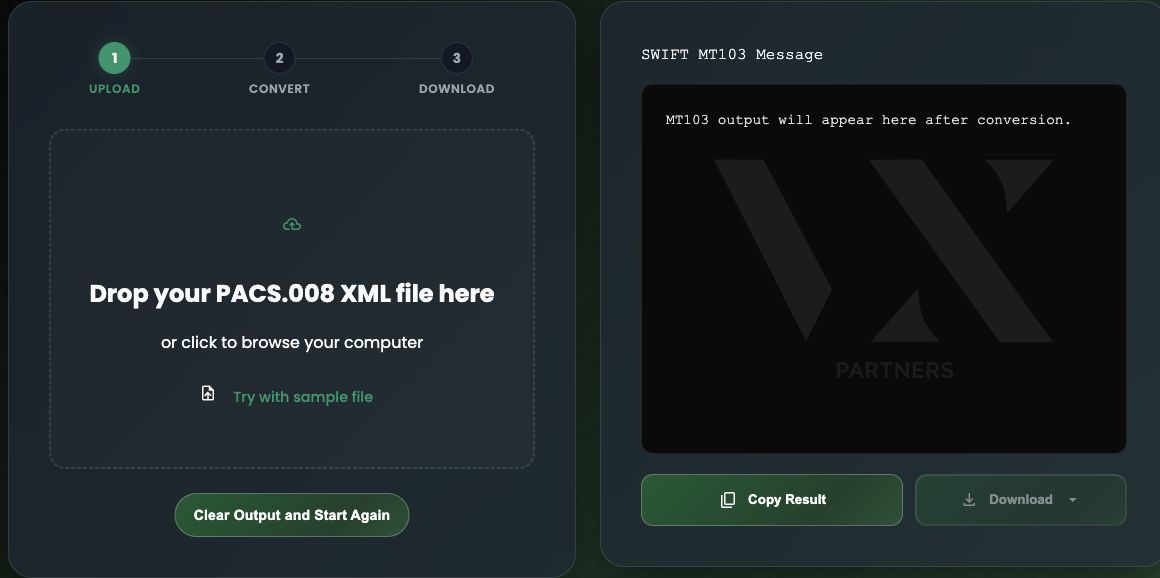
The VX converter has a separate interface for uploading XML, viewing text output, and copying or downloading a result. Its upload and output areas sit beside each other, with a sample-file option and a reset control.
The practical task is to turn information in a supported XML payment message into a text preview. The implementation I worked on supports a defined single-payment pacs.008.001.08 input profile and produces an MT103-format text preview. That scope is narrower than the general phrase “XML to SWIFT converter” might suggest. Unsupported versions, batch files and payment details outside the implemented profile are rejected rather than treated as interchangeable inputs.
A useful implementation detail is how the interface handles a new file. Previous output is invalidated when a new selection begins, and copy/download actions depend on a valid current result. A failed attempt should not leave an older result looking like the output of the file just selected. Resetting the tool also cancels the active request and invalidates its result.
These behaviours are part of making a small utility understandable. The user needs to know which input produced the visible result, whether processing succeeded, and whether an export is available.
The converter does not send a payment, prove that a payment occurred, or certify that a bank will accept its output. It is not a universal ISO 20022 translator. Operational use requires the supported input profile and mapping choices to be reviewed by a payments specialist.
For a custom financial tool, I would define the accepted inputs, expected outputs, rejection rules and review responsibilities before promising a broad integration. The custom web-app service covers how I approach tools built around a specific task.
Scope the website and software separately
VX illustrates why a financial website brief needs more detail than a list of pages. A service explanation, a platform link and a data-processing utility can sit within the same visual identity while requiring different work.
| Part of the project | What to establish before building |
|---|---|
| Public website | Services, audiences, language versions, approved copy and the intended enquiry route. |
| Existing platform access | Destination URLs, who should use each route, and who owns the system beyond the handoff. |
| Custom utility | Supported inputs, output meaning, failure states, data handling and any specialist approval required. |
If you are commissioning similar work, prepare the service information and existing platform details first. Identify who can approve financial and legal wording, who maintains each language version, and who will respond to enquiries.
For a tool, include representative synthetic inputs and explain what should happen when an input cannot be supported. That gives design and development a concrete task to solve without exposing customer payment data.
Planning a financial-services website?
Send me your current website, the services you need to explain, the audiences and languages you serve, and any existing platforms the site must connect people to. If a custom tool is involved, describe its task and who can approve its requirements.
You can review my web-design service or discuss your financial-services website. I can help define the website work and any separately scoped functionality before we agree the project.