
A website refresh improves selected pages, content or styling within a usable structure. A redesign changes how the site is organized and experienced. A rebuild replaces the technical foundation. Your project can involve more than one.
Choose a refresh when the existing structure and platform support your customers; choose a redesign when the offer, navigation or customer journey needs to change. Rebuild only when a verified technical constraint requires it.
I choose between them by tracing what a customer needs to do and where the current site gets in the way. Here is the process, including repairs I made to my own website in October 2026.
First, define what needs to change
Write down the business change behind the request. You might have added a service, moved into online sales or started receiving the wrong enquiries. Each calls for a different response.
For a car importer such as CB Automobile, the website has to explain the service and help someone make an enquiry. An online parts shop, such as CB AutoTech in my portfolio, also needs product and purchase journeys.
Those two briefs cannot be compared by page count alone. Adding an enquiry section and adding a shop introduce different content, maintenance and testing requirements.
Try this sentence: “We need people to ___, but they currently cannot because ___.” If the second blank is a guess, investigate it before choosing a platform or commissioning layouts.
Test one complete customer task
Start on the page a visitor would actually arrive at. Find the relevant offer, read the details and follow the next step on a phone. Check the confirmation and destination of any test enquiry in a controlled environment.
Keep observations separate from explanations. “The contact link returns a 404” is an observation. “The design is losing leads” needs evidence about visits, attempts and completed enquiries.
- Can someone describe the service after reading the page?
- Can they find an example relevant to their project?
- Do links and forms lead to the intended destination?
- Can the team update the details that change regularly?
- Does the same journey work with a keyboard and on a phone?
A recurring problem across several templates deserves a wider investigation. A single missing link may have a much smaller fix. Record the affected URLs so the recommendation has a clear boundary.
What I repaired on ronny.design
On 17 October 2026, I restored a Blog link that had disappeared from the site's normal navigation. The articles still existed, but readers needed a working route to them.
I also restored dedicated Web Design and App Development pages and redirected relevant retired service URLs to their current destinations.
These were specific discovery and URL problems. The work could be defined and verified without commissioning another visual redesign. I checked the public responses, navigation and sitemap after deployment.
The site now uses Next.js and previously ran on WordPress. That history does not prove a framework change is necessary for another business. A WordPress site can need the same link and URL repairs.
My technical SEO audit guide covers the implementation checks. Here, the useful decision is whether a repair solves the identified problem within the current structure.
A quiet inbox does not identify the design problem
Check the whole chain: relevant visitors reaching the page, understanding the offer, attempting contact, the enquiry being saved or delivered, and the business following up. Low traffic calls for a different investigation from a form that accepts details but never delivers them.
On my own site, I kept the existing contact-page design while adding saved enquiries, email notifications and separate contact-interaction tracking on 21 October 2026. I verified a labelled test enquiry and its email notification. A WhatsApp click remains a handoff, not proof that a message arrived.
That was a delivery and measurement improvement. It is not evidence that a redesign increased leads. Before judging your own changes, distinguish genuine enquiries and qualified opportunities from test submissions and button clicks.
Three project examples: what actually changes the scope
These examples show requirements in my work, rather than before-and-after redesign results. The useful question is what your website needs to let a visitor do.
CB AutoTech: product discovery is part of the structure
CB AutoTech has on-road and off-road shopping routes, product categories, vehicle-model browsing and search by brand, model or OEM number. A buyer looking for a particular part needs more than a new homepage image.
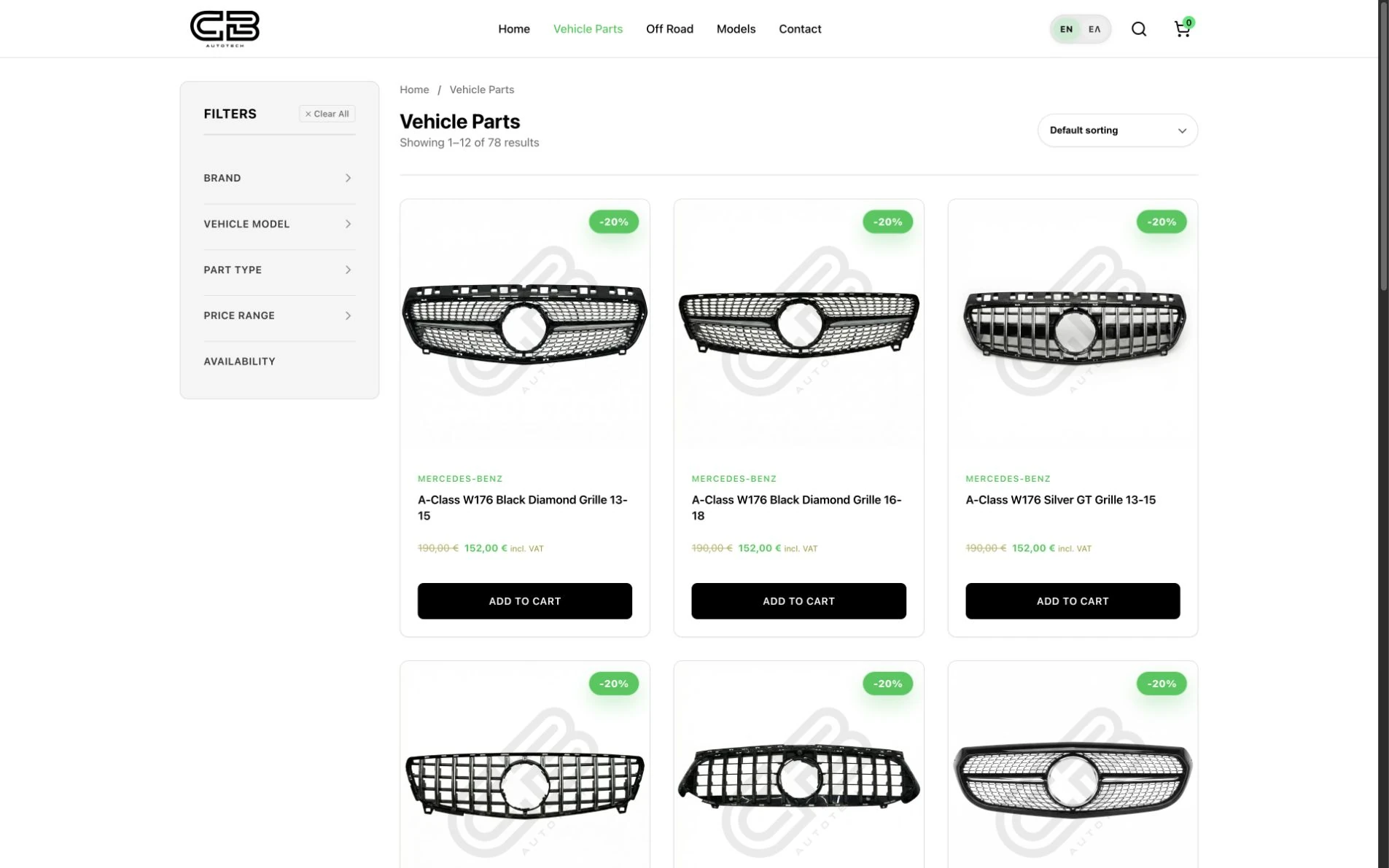
If those routes already work on your shop, a refresh could improve product photography, descriptions and the clarity of the next action. If customers cannot narrow down the right product, investigate the catalogue structure, search and available product data. That may require a redesign of the shopping journey; a platform replacement still needs its own technical justification.
The Purple Owl: different offers need different next steps
The Purple Owl website separates creative experiences from lounge table bookings. Someone choosing an activity needs different details from someone reserving a table. I explain those routes in the Purple Owl booking-journey example.
For a business with several offers, updating a button label can be a refresh when it resolves the ambiguity. If visitors must repeatedly backtrack because services and actions are mixed together, plan the navigation and page sequence first. Changing the booking interface is a separate scope from replacing the system that handles the booking.
Lara Melachrinou: preserve the work, improve how it is explored
Lara’s portfolio organizes artwork into collections and links to individual paintings. The images, collection choices and painting information each have a job. A refresh can update imagery and presentation while retaining a useful collection structure.
If your portfolio needs new ways to group work, new project details or a different process for adding work, define those content and editing requirements before commissioning layouts. A visual redesign can keep the current platform when it supports them.
See more of these projects and how I scope new work on my web design and development page.
Choose the smallest scope that handles the whole problem
Scroll the comparison sideways to read all three columns.
| Scope | A reason to choose it | What to verify |
|---|---|---|
| Targeted repair | An isolated broken route, missing link or incorrect detail. | The affected journey works after the change. |
| Refresh | The structure supports customers, while copy, imagery or presentation needs attention. | Representative pages remain readable and usable across devices. |
| Redesign | The offer, audiences or navigation have changed substantially. | New page groups support the main customer tasks. |
| Technical rebuild | The existing implementation cannot reliably support required behavior or maintenance. | A technical investigation demonstrates the constraint and tests the proposed replacement. |
Ask whoever recommends a rebuild to show the limitation. It could involve an unsupported dependency, an unsuitable content model or an integration that cannot be implemented reliably in the present setup.
Also ask whether a smaller change was evaluated. A replacement comes with migration, staff training and ongoing maintenance work. Include those in the comparison.
What determines the cost and timing?
A refresh is often a smaller project because it retains more of the existing site. That does not give it a standard price or deadline. A large content update can involve more work than redesigning a small, simple site. Compare the tasks and dependencies in the proposal.
- Pages and templates: identify which layouts change and how many service pages, products or projects need individual content work.
- Content readiness: name who supplies copy, photography and translations, and when they will be available.
- Functions and data: list forms, search, checkout, booking and external connections. Separate preserving an existing connection from building a new one.
- Migration and launch: account for content transfer, redirects, account access, preview testing and rollback preparation.
- Review and handover: agree who approves the work, what the team must be able to edit and who maintains it afterward.
Ask for the build fee and recurring costs—hosting, domains, licences and any ongoing support—to be listed separately. A fixed business deadline should be matched to an agreed launch scope, with later improvements listed explicitly. I quote website work against that scope; there is no universal redesign price or turnaround promised here.
My web design proposal checklist helps you compare what is included before choosing between offers.
Use this worksheet before requesting a quote
Copy the table and fill it in with your team. Add a screenshot or URL beside each observation. Avoid a numerical score: one blocked customer task can matter more than several cosmetic issues.
| Question | Your evidence |
|---|---|
| Which customer task is failing? | Record the start page, intended action and exact point of failure. |
| How widespread is the problem? | List affected pages, templates, devices and user groups. |
| Can the current system support a fix? | Ask for a small demonstration or a documented technical constraint. |
| What should the work preserve? | Identify useful content, existing URLs, enquiries, integrations and editing tasks. |
| How will you accept the result? | Define a repeatable task and the expected outcome. |
For example, “make the site modern” leaves acceptance open to interpretation. “A mobile visitor can find the import service, review an example and send the right enquiry” gives the project a testable direction.
Protect the useful parts during launch
Before launch, save the current URL list and identify pages that receive useful search visits or enquiries. Keep those addresses and their useful content where practical. If a URL must change, map it to the closest relevant replacement rather than redirecting everything to the homepage.
- Before: save the current site and content, record form destinations and account access, and test the changes in a preview environment.
- At launch: check changed redirects, page titles, canonical URLs, sitemap entries and indexing settings. Complete the main customer tasks on desktop and mobile, including enquiry receipt.
- After: review Search Console for unexpected exclusions and broken destinations. Keep a rollback route if critical functions fail.
Google's site-move guidance explains URL mapping and redirects. A redesign does not guarantee a search improvement, even when the launch is technically sound.
Keep baseline measurements for the task you intend to improve. Review completed enquiries separately from button clicks, and allow for changes in traffic sources when comparing results.
Common questions
Does an old-looking website always need a rebuild?
Its age alone is not enough to decide. Check customer tasks, content editing and technical constraints. A visual refresh may be sufficient when those foundations still support the business.
Can I redesign without changing every URL?
Yes. Page design and URL structure are separate decisions. Preserve useful URLs where possible, and plan appropriate redirects for addresses that genuinely need to change.
What should I send for an initial review?
Send the current site, the task you want to improve, examples of the problem and any deadline tied to the business. That is enough to begin a useful scope discussion.
If you want help deciding, send me your website and the customer task you want to improve. Include where the journey breaks, what needs to stay and any business deadline. I can assess the scope with you before we commit to a refresh, redesign or rebuild.