Start with what your customer needs to choose. A shop with three bottle sizes can give each product plenty of room. A specialist parts catalogue needs ways to narrow the range before someone opens a product page.
Those choices shape the design: the images, the information on each card, the navigation and the product page itself.
I’m Ronny Sarianides, a designer and developer based in Athens, working with businesses in Greece and internationally. Here are two examples from my work, with the details I would look at when planning your online store.
PYTHIA: give a small product range a clear identity
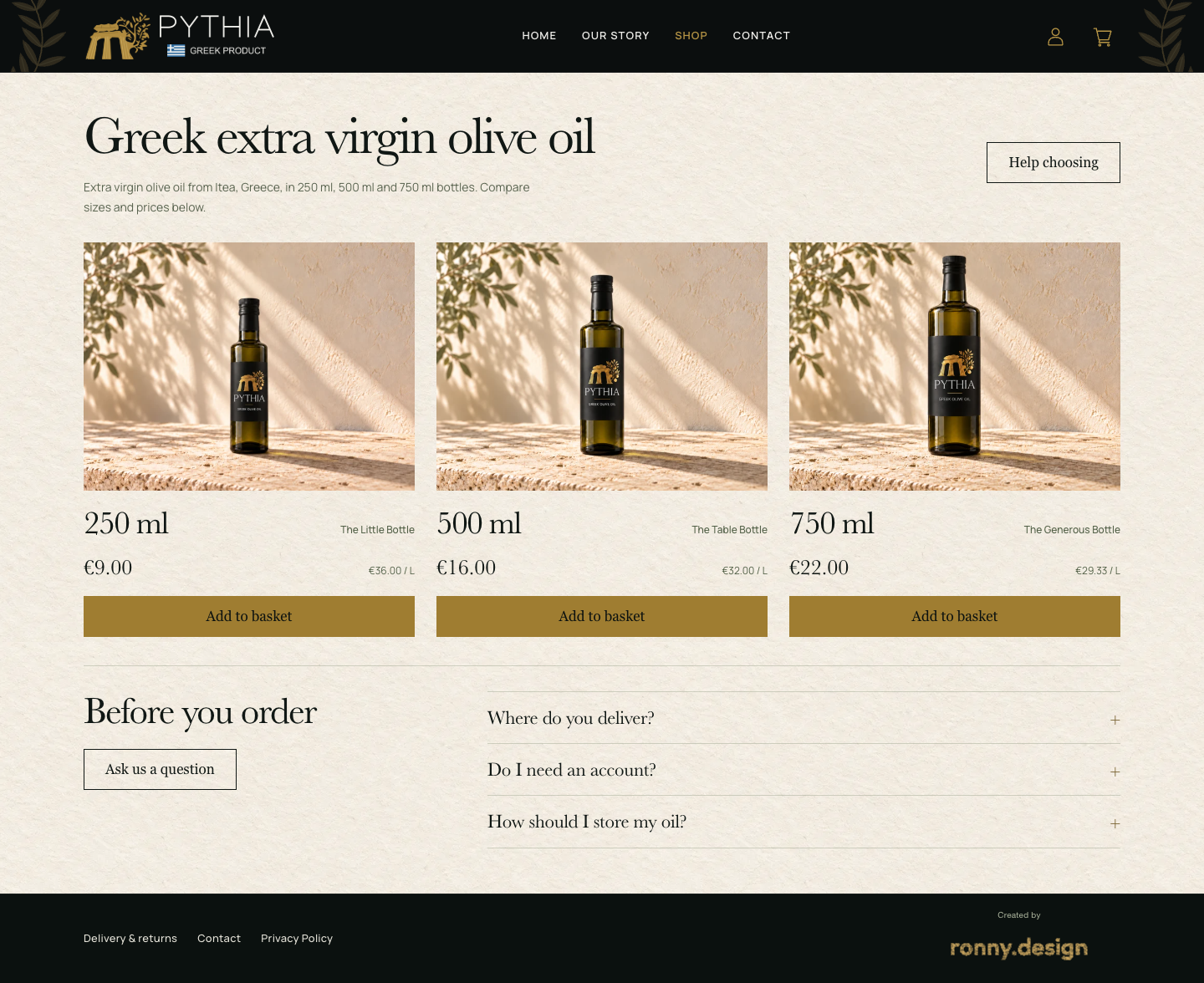
PYTHIA’s shop presents three sizes of olive oil. Warm, textured backgrounds, large bottle images and restrained gold accents give the range a consistent visual identity.
Look at three decisions in the screenshot:
- The images follow the same composition. Each bottle appears against a similar setting, so the range reads as a family.
- Size leads the product card. The volume is prominent, with a short name alongside it. Customers can compare the available sizes without opening every page.
- The page leaves room around the products. With a small range, there is space to show the imagery rather than fill the screen with categories and filters.
The lesson to borrow is the relationship between the range and the layout. If you sell six carefully chosen products, a dense catalogue may be unnecessary. If you sell hundreds, showing everything this way could make browsing cumbersome.
Before choosing a visual reference, put your actual product names and images into it. A layout that suits three short labels may struggle with long descriptions, several finishes or a much larger range.
Let the product page answer the next questions
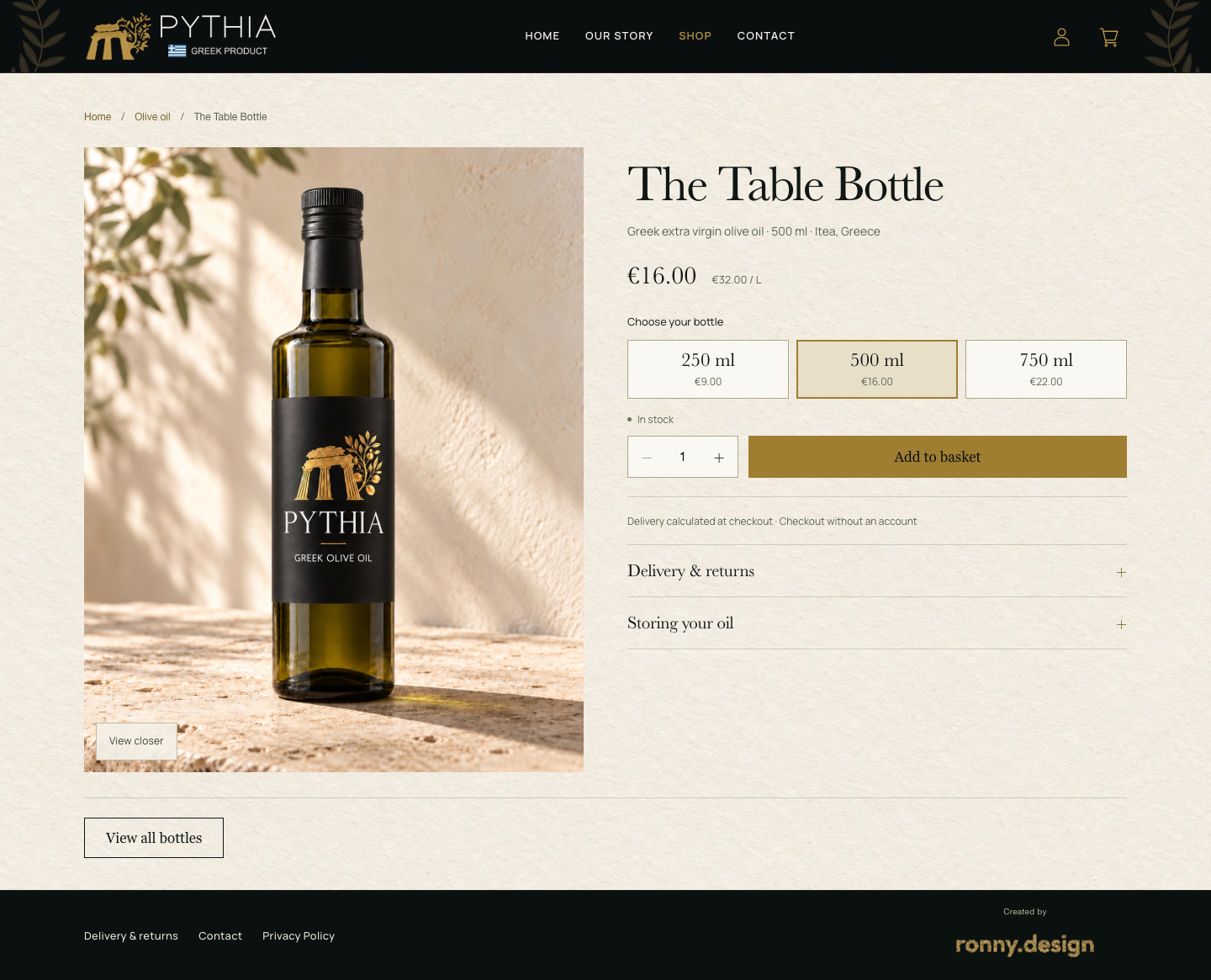
On the product page, the bottle image has more room. The product name, volume, price and size choices sit together on the other side. Delivery and storage headings appear below the main buying controls.
That is a useful way to review your own product page: list the questions someone needs answered, then decide where each answer belongs. For a food product, that might include quantity, ingredients, storage and delivery. For clothing, it might be measurements, materials and care. Your actual products should determine the information.
The images also need a plan. Decide what each photograph or piece of product artwork must show, which views you need and who will supply them. The imagery in a design reference is part of why it looks the way it does.
CB AutoTech: give customers more than one route into the catalogue
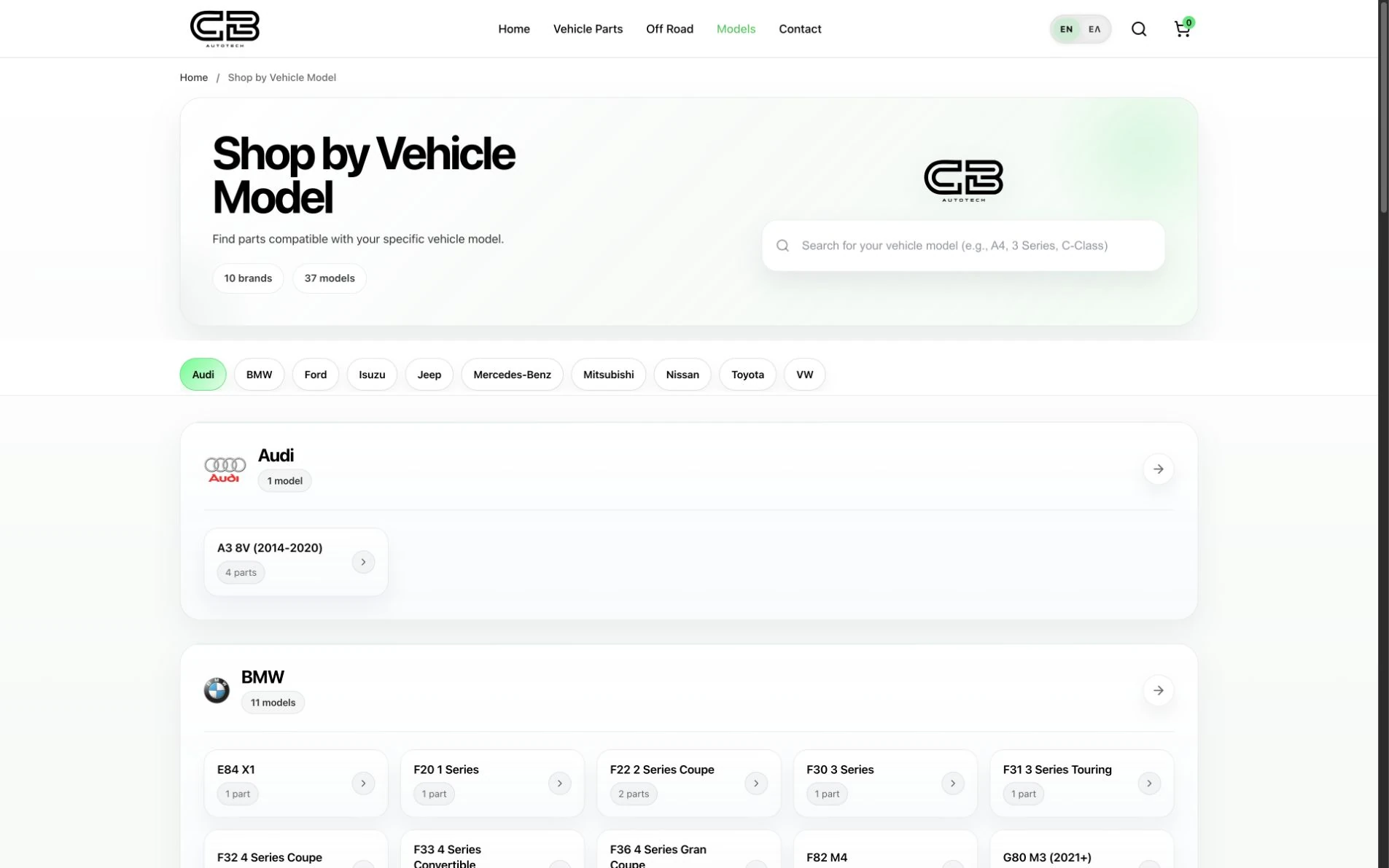
CB AutoTech presents a different browsing task. Someone looking for a vehicle part may start with a category, a vehicle model or a specific product reference.
Its site provides separate Vehicle Parts, Off Road and Models routes. The vehicle-model browser groups named model links under vehicle brands. The search interface also provides guidance about searching by brand, model or OEM number.
The design idea to borrow is to work with information your customers already know. A visitor who knows their car model has a different starting point from someone browsing a product category. Those routes can sit alongside one another.
A model browser’s appearance does not establish that every product relationship is correct. For a similar project, the brief needs to identify who supplies the catalogue data, who checks compatibility information and which selections must be tested.
Make product cards useful for comparison
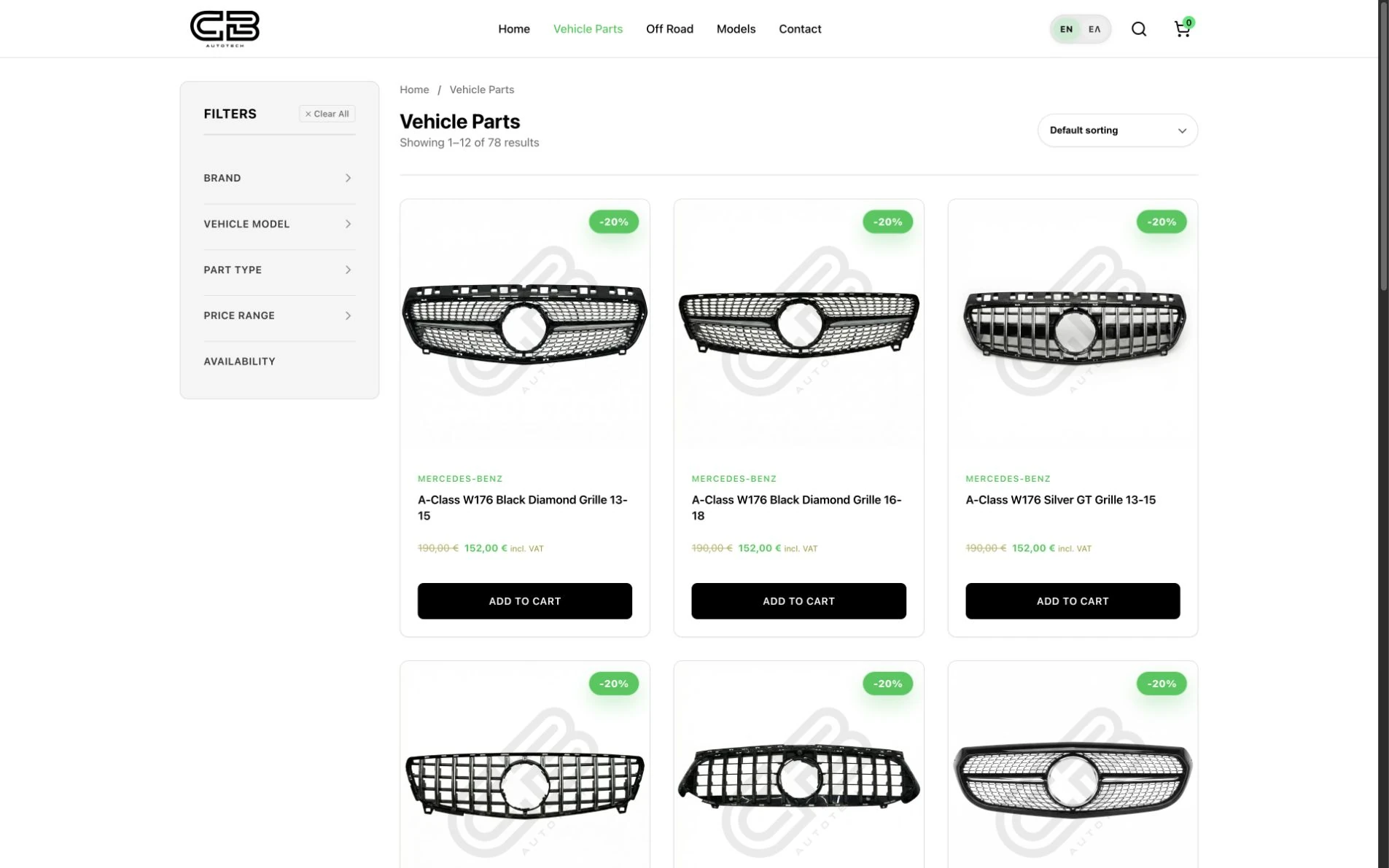
The catalogue screenshot shows a sidebar with headings for brand, vehicle model, part type, price range and availability. Product cards give the images room while retaining detailed names, including model references and year ranges.
The first two black-grille cards carry different year labels: 13–15 and 16–18. Their images look similar, so those details need to remain readable. These are the labels shown in the captured catalogue; part compatibility still needs its own checks.
For your catalogue, agree which details belong on a card and which belong on the full product page. Define any filters and relationships from the actual product data. Their appearance in a reference does not make them a standard feature of every store or part of a basic build.
Which approach fits your store?
You can borrow visual ideas from either project without copying the whole structure. Start with the buying decision your own range creates.
| Decision | A small, focused range | A specialist parts catalogue |
|---|---|---|
| What should visitors compare first? | A few products, sizes or finishes | Categories, specifications or relevant models |
| What earns space on a product card? | A clear image and the main difference between options | Enough identifying detail to distinguish similar items |
| What navigation is needed? | Direct routes to the range and product pages | Agreed category, model, search or filter routes |
| What needs planning before design? | Product imagery, descriptions and the available options | Product data, naming, relationships and the rules behind navigation |
These are planning choices, not fixed rules. A growing food range may need filters; a small specialist supplier may only need a straightforward catalogue. Work from your actual products rather than the number of features on another website.
Check the design on a phone before signing it off
Desktop screenshots are useful references. For your own build, include these checks in the review:
- Start from the shop, a category or a model route and find an agreed example product.
- Read its full name, options and essential details without relying on hover effects.
- Change an option or quantity and check that the selection is clear.
- Follow the agreed route towards ordering or enquiring, including any questions about delivery.
Use specific example tasks from your catalogue. A screenshot review and a completed shopping test are different checks; both should have a place in the agreed delivery process.
Bring a useful brief, even if you have not chosen a platform
Save two or three references and write one sentence beside each: “I like how this shows the product,” “I need customers to browse by this detail,” or “This is the information I want beside the price.”
Then add:
- what you sell, with a few representative products;
- the number of products and options, such as sizes or colours;
- the images and text you already have;
- what you need to edit yourself after launch;
- your selling countries, payment and delivery requirements.
That gives us something concrete to discuss before choosing the implementation. My WooCommerce website design and development service sets out a new-store starting scope from €3,000, plus VAT where applicable. Bespoke filters, catalogue relationships and other additional functions need their own assessment and quote.
To turn those requirements into a budget, use my ecommerce website cost guide and first-year worksheet. It separates the build scope from recurring expenses and costs that still need a quote.
For a project that combines a shop with broader service or portfolio pages, see my web design and development work.