For a new WooCommerce store built by me, the starting price is €3,000, plus VAT where applicable. That covers an agreed design and a straightforward store in one language. Your final quote depends on the catalogue, content, selling market and functions you need.
Your first-year budget also needs to account for the costs around the build: domain, hosting, paid extensions, payment processing and any ongoing help you choose. A build quote and a platform subscription pay for different things. Compare the work included and the payments due over the same period.
This guide explains my starting scope, uses two projects to show why requirements change the work, and gives you a worksheet for planning the first 12 months. The examples explain requirements. They do not disclose what either client paid.
Start with how you want to build the store
If you plan to set up a store yourself, budget for the tools you choose and the time you will spend preparing products, adapting the design and checking the shopping journey. A low subscription price does not include someone doing that work for you.
If you want a designer and developer to handle the build, ask for a written scope alongside the fee. It should explain the pages, initial product setup, content work, editing access and launch checks. You should be able to see what you are buying before comparing the headline price.
For an existing store, first establish what can stay. A design refresh, a new checkout requirement and a full platform migration are different projects. My redesign versus refresh guide helps with that decision. The €3,000 starting offer below is for a new store.
What my €3,000 starting offer includes
The starting scope for my WooCommerce design and development service includes:
| Area | Starting scope |
|---|---|
| Design | One design direction, a page map, and homepage and product-page design previews for approval. |
| Store structure | Homepage, catalogue and category views, a product-page template, basket, checkout, contact and up to two information pages, adapted for desktop and mobile. |
| Initial catalogue | Up to 30 simple products and five categories. A simple product has one purchase option, without size or colour variations. This is an initial setup limit, not a limit on future catalogue capacity. |
| Content preparation | Entry and light editing of your supplied final text, up to 4,000 words, plus web preparation of up to 100 supplied images. |
| Everyday editing | Access to edit product names, descriptions, images, prices and stock, plus agreed text, images and contact details on existing pages. |
| Payment and delivery | One compatible payment provider and straightforward shipping rules for one agreed selling market, subject to compatibility and account access. |
| Search foundations | Core titles and descriptions, clean URLs, a sitemap and indexability checks. Ongoing SEO and individual product keyword research or copywriting are separate. |
| Review and handover | Two consolidated revision rounds, written guidance and up to 60 minutes of training. |
| Launch checks | Desktop and mobile checks, basket and test-order checks, payment-provider test mode where available, shipping calculations and core order emails using the agreed settings. |
The price is from €3,000, plus VAT where applicable, rather than a fixed fee for any store. We confirm your requirements before the final quote. You supply or approve product information, imagery, prices, legal copy, and tax and shipping settings.
The build includes 30 days after publication to report and correct faults in the agreed work. Ongoing maintenance, new content entry by me and additional features are separate services. Photography, substantial rewriting and complex image retouching are also separate.
What changes the amount of work?
The number of products is only part of the brief. Also explain how customers choose a product and what information you need to maintain.
PYTHIA: a small range with specific presentation and editing needs
The local PYTHIA pre-launch build shows three bottle-size choices linking to separate product pages. The product page brings together the bottle image, name, volume and price, with delivery and storage information below the main buying controls.
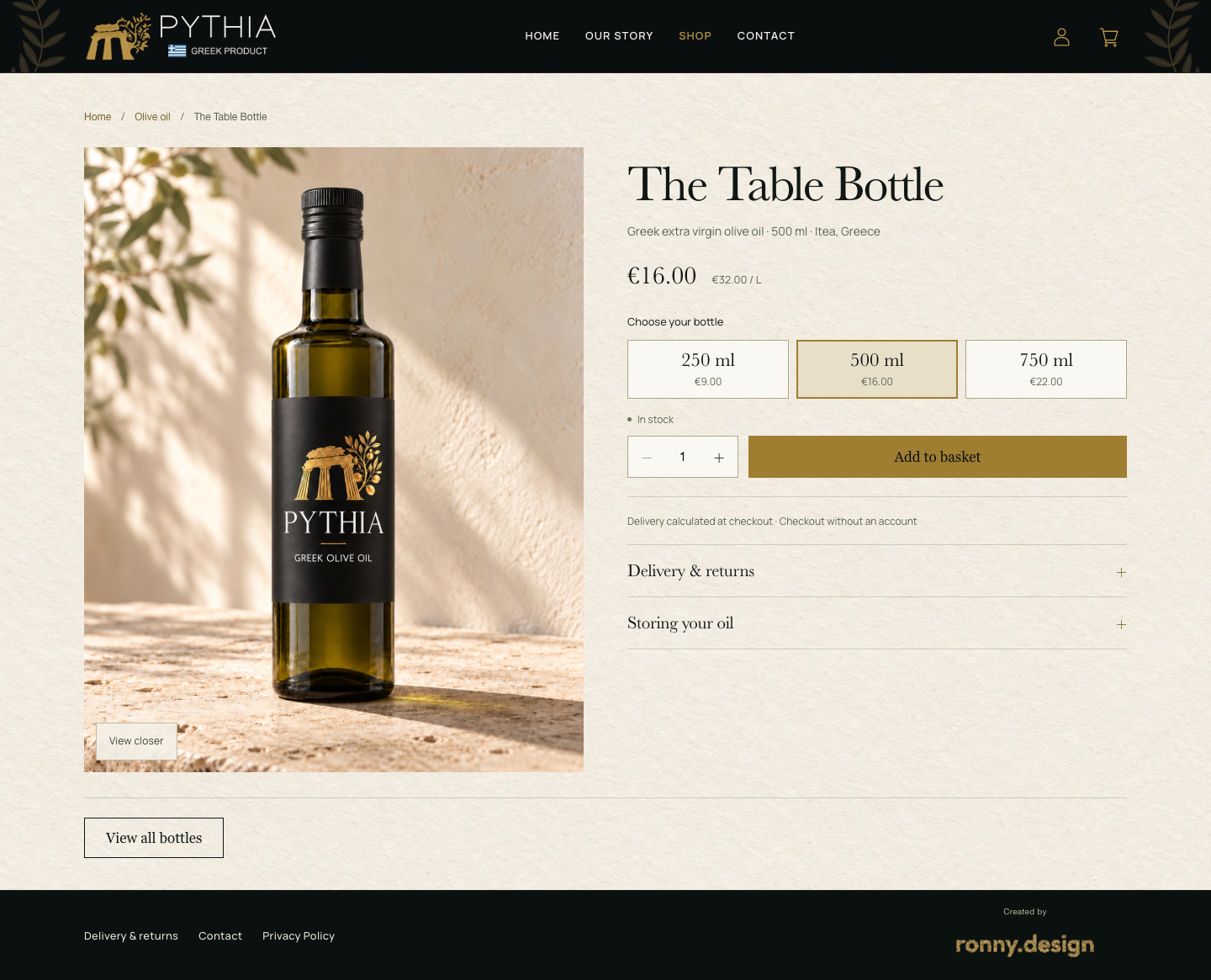
The product-card note also has a custom editing field. In a recorded local test, I changed that note, saved it and checked the change on the homepage without changing the product price.
For a quote, the useful questions are: which details should appear together, which information will change regularly, and which fields should you be able to edit? The custom field in PYTHIA is project-specific work. It is not automatically included in every WooCommerce build or in the starting offer.
This example demonstrates the design and editing decisions. It does not establish a launched store, completed payments or sales results.
CB AutoTech: catalogue structure affects the brief
CB AutoTech presents another set of requirements: product categories and routes through vehicle makes and models. Its model-browser screen shows why the way a catalogue is organised matters alongside the number of products.
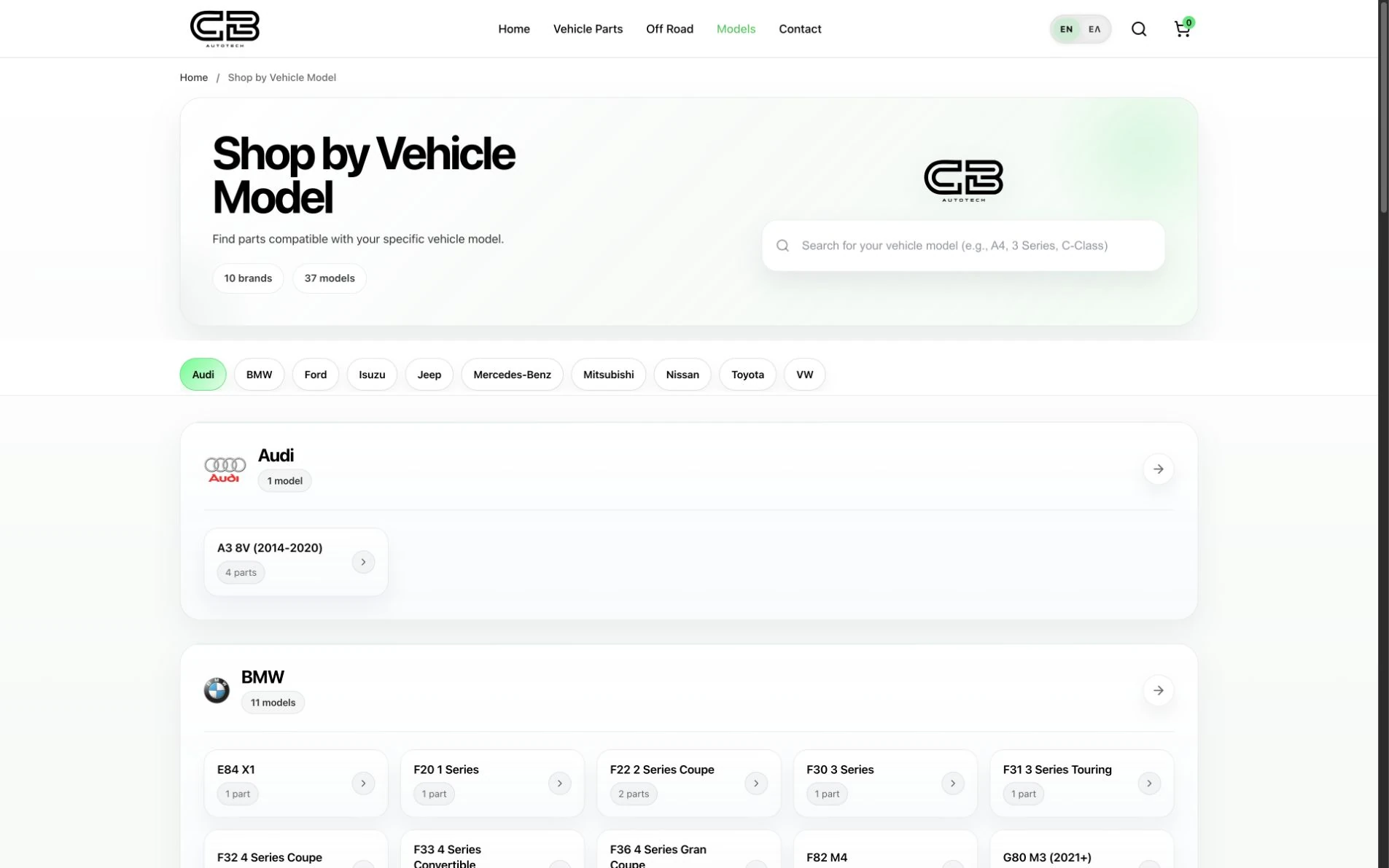
If customers need to browse by vehicle model, discuss who supplies the product relationships, how those records will be checked and who maintains them. Special filters, compatibility rules and external stock connections require their own assessment and quote. The screenshot does not establish automatic fitment checking or an ERP integration.
You can compare the layouts in my ecommerce website design examples. Use them to explain what your customers need, rather than assuming every pictured feature belongs in a standard package.
Separate the build fee from costs that continue
Ask for each cost to be identified as included, quoted separately, estimated or still to confirm. Do not add an item again if it is already included elsewhere in your quote.
| Cost | What to establish before committing |
|---|---|
| Build and agreed extras | The final scope, fee, payment stages and how changes will be priced. |
| Domain and hosting | Who supplies them, who owns the accounts, the billing period and the renewal price. |
| Paid extensions or other subscriptions | Which are required, who holds each licence and what renewal or usage charges apply. |
| Payment processing | The provider's current terms for your business and selling market, including any fixed, percentage or other applicable fees. |
| Content and catalogue preparation | What you supply, what I enter or edit, and any separately agreed writing, photography or data preparation. |
| Ongoing support | Whether you want a maintenance arrangement, occasional help or additional content work, and what each agreement covers. |
| Customer acquisition | Any separately planned SEO, advertising or content work. Launching a store does not guarantee traffic or sales. |
For a more involved store, also discuss variations, multiple languages, migration, wholesale pricing, subscriptions, ERP or marketplace connections and complex shipping. These need a separate scope. A plugin's advertised feature list is not confirmation that it fits your process.
Your first-year budget worksheet
Download the editable first-year budget worksheet (.xlsx).
Use the same currency and a consistent tax basis across your entries. If suppliers quote in different currencies, record a dated conversion assumption and allow for uncertainty. Confirm the tax treatment that applies to you rather than assuming every quoted figure includes the same taxes.
Define the first year as the 12 months from your agreed project start date. Count only the payments due in that period. A full year of monthly hosting means 12 payments; hosting starting six months into that period means six. An annual subscription paid once is one payment unless another renewal falls within the same period.
The accompanying workbook has editable rows for these items:
| Budget item | What you enter |
|---|---|
| Agreed build fee | Total build payments due within year one, with a payment count of one. Use your written payment schedule. The public €3,000 starting price is a reference, not your final quote. |
| Separately agreed functions or migration | Only work outside the build fee. |
| Extra content, images or catalogue preparation | Work not included in the agreed scope. |
| Domain | Amount per payment and number due in the first year. |
| Hosting | Amount per payment and number due in the first year. |
| Paid extensions and subscriptions | Combined first-year amount, or itemise them in the spare rows. Use one approach to avoid duplication. |
| Ongoing support and maintenance | The agreement you actually choose. |
| Customer acquisition | A separately planned first-year allowance, if applicable. |
| Payment-processing and other variable fees | Your own first-year estimate based on provider terms and a stated sales assumption. It is not a sales forecast supplied by me. |
| Other costs or taxes not already counted | Label the item and avoid adding the same tax twice. |
For recurring rows, the calculation is amount per payment × payments in year one. For an aggregate estimate, enter the whole first-year amount with a payment count of one.
For build instalments, add only the payments due within your first-year period and enter that total with a count of one. Do not multiply the full project fee by the number of instalments. The same method works when individual payments differ or part of the fee falls outside year one.
The workbook keeps a priced subtotal separate from a complete budget. Rows marked To confirm remain visibly unresolved. Mark a row Included elsewhere or Not needed only after checking it, including any unused additional rows. An empty amount is not treated as a free service. Estimated rows remain labelled even when a total can be calculated.
Keep the supplier, quote date and inclusion notes beside the amount. The €3,000 starting offer is shown separately for reference and does not silently populate the build-fee input.
The worksheet is a cash-budget planning aid. It does not include inventory, fulfilment, returns, staffing or the other costs of running your business unless you add them explicitly.
Turn the budget into a useful enquiry
Before asking for a quote, send your product count, any variations, target selling countries, languages, payment and delivery requirements, and the content you already have. Include an existing website if there is one, your target launch date and the updates you want to make yourself.
If a requirement can wait, identify it as a later phase. That gives us a way to agree a smaller first release without pretending the deferred work is included.
I am based in Athens and work remotely with international clients in English. Tell me about your store and budget, and I will use the requirements to discuss an appropriate scope and quote. You can also use my web design proposal checklist to compare what different proposals actually include.